Licensing Breakdown
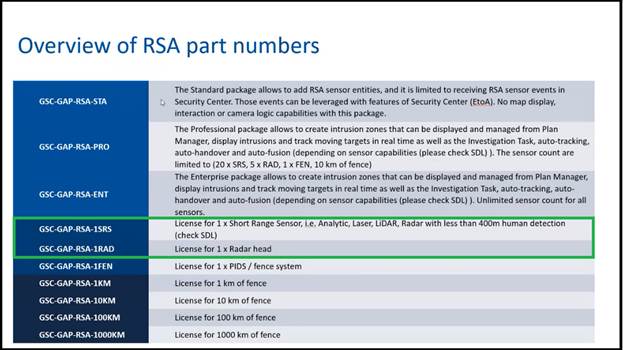
Base Licenses
- Standard (GSC-GAP-RSA-STA):
- No include map display feature
- Supports unlimited radars
- Pro (GSC-GAP-RSA-PRO):
- Includes map display feature
- Limited to 20 SRS (Short Range Sensors) and up to 5 Radars
- Enterprise (GSC-GAP-RSA-ENT):
- Includes map display feature
- Supports unlimited radars
Radar Licenses
- SRS (GSC-GAP-RSA-1SRS):
- Models: SR-150, SR-250, SR-500, AR-300
- License is valid when using ISG tracking system, not valid for Magos tracking system.
- Radar (GSC-GAP-RSA-1RAD):
- Model: SR-1000
Where to check existing licenses?
Config tool > About > Purchase order

Do we need the map display, which is only included in the Pro and Enterprise base packages?
The integration will work with the Standard base package. However, Genetec recommends using the Pro or Enterprise packages so operators can benefit from the map display feature, which allows them to see and track targets visually.
- For smaller deployments like POC or small sites, the Standard license may be sufficient due to its simplicity.
- For larger sites with multiple or diverse sensors often already use the Pro or Enterprise licenses.
The Pro package is limited to 20 SRS and 5 radars. If these limits are exceeded, upgrading to the Enterprise package is required, as it supports unlimited radars and includes the map display.
Which tracking system should be used — Inter-System Gateway Tracking System or Magos Tracking System?
The Inter-System Gateway (ISG) Tracking System should be used.
- The Magos Tracking System is no longer under active development.
- From a licensing perspective, ISG is more cost-effective.
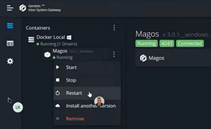
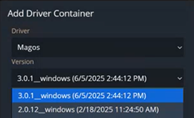
Which Magos driver container version is recommended for use with the Inter-System Gateway?
Always use the latest available version.
Is there any documented MASS version and Genetec/RSA plugin version recommended by Genetec to ensure best compatibility?
- There is no specific version officially documented. Refer to Genetec Public Device Support list, which is regularly updated with the latest supported MASS SDK versions.
- Currently, SDK version 3.23.10 is listed, which supports MASS versions 3.23.x, 3.24.x, and 3.25.x.

Adding Bosch to Genetec overwrite camera configuration (profiles list, poisoning space), how to work with those cameras?
- When adding a Bosch camera to Genetec, the system will automatically reconfigure the camera due to the deep integration between the two platforms.
- Avoid configuring Bosch cameras directly via their web interface; instead, use the dedicated configuration section within Genetec.
Steps for Migrating from the Old RSA Mechanism to the new ISG Mechanism
Migrating from the Magos Tracking System (old RSA mechanism) to the Inter-System Gateway (ISG) mechanism requires converting existing radar licenses to short-range radar (SRS) licenses.
If such a migration is needed, the customer must contact the person responsible for the project, who will assist with the license conversion process.
Does changing zones in MASS automatically update the zones in RSA, or does it require a re-import?
Changing zones in MASS requires a manual re-import into RSA.
Does adding radars in MASS automatically update the radars in ISG, or does it require a re-import?
Adding radars in MASS requires a manual re-import into ISG, restarting the Magos driver will trigger the re-import process.